Try the demo (no account)
Use a fully interactive wsky1 portfolio at /demo — add real bottles, set a purchase cost, and watch the total value and gain/loss recalc against live auction data, all without signing up.
Want to see what wsky1 does before you sign up? wsky1.com/demo is a working portfolio, not a marketing mock — it's the same screen you get after signing in, running on real Scotch Whisky Auctions hammer data. Add a bottle and its value appears; set what you paid and your gain/loss appears. Nothing is saved and no account is needed.
Open it
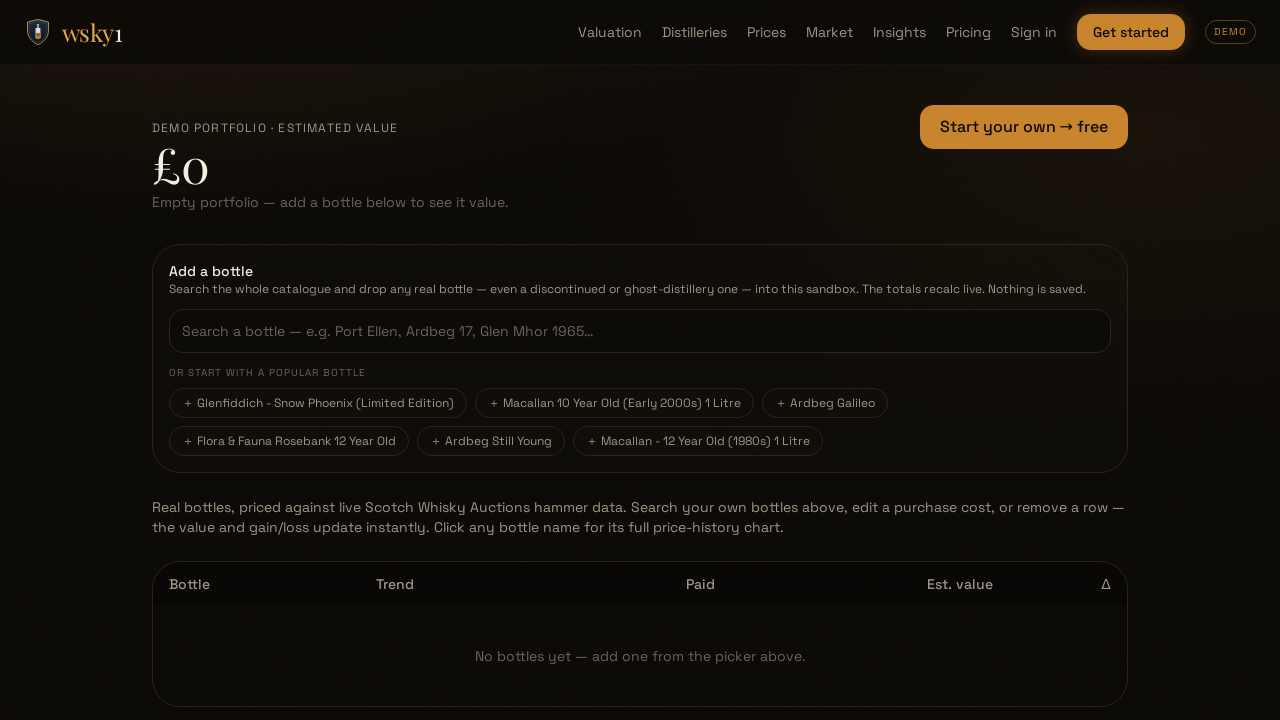
Go to wsky1.com/demo — it's public, so there's no login. The demo opens empty: a DEMO PORTFOLIO · ESTIMATED VALUE of £0 with the prompt "Empty portfolio — add a bottle below to see it value." You build the portfolio yourself.
1. Add a bottle
Use the Add a bottle search. It searches the whole catalogue — the same catalogue the public valuation search uses — so you can add any priced bottle, including your own discontinued or ghost-distillery releases. Under the search box are a handful of suggested bottles (well-known releases with rich auction history, e.g. Ardbeg 17 Year Old, Glenfarclas 25 Year Old) — click one to add it in a single tap.
Each bottle you add resolves its real hammer-price series from Scotch Whisky Auctions, so the row lands with a genuine chart behind it, not a fabricated number.
The sandbox holds up to 12 bottles. Once you reach the cap, adding is disabled until you remove a row — that's a preview limit; a real account is unlimited on Collector.
2. Watch it value live
As soon as a bottle is in the portfolio, the header updates:
- Estimated value — the sum of every row's latest hammer price, in GBP.
- Portfolio value chart — once you hold more than one priced bottle, a "Portfolio value · monthly · real SWA hammer data" line chart draws your collection's value over time, and re-draws whenever you add or remove a bottle.
Each row shows the bottle, its Trend, your Paid cost, and its Est. value. Click any bottle name to drill into its full price-history chart.
3. Set a purchase cost to see gain/loss
Every row has a Paid field. Type what you paid and the headline switches from a plain total to your gain or loss versus cost — for example:
£4,180
▲ £620 (+17.4%) vs £3,560 paid
Green is a gain, red is a loss. This is exactly how the portfolio P&L works in the real app — see Valuation & confidence bands for how each estimate is built.
4. Remove a row
Every row has a Remove control. Removing a bottle recalculates the total, the gain/loss, and the chart instantly. Add, remove, and re-cost as much as you like — nothing is saved. The demo is a throwaway sandbox; close the tab and it's gone.
When you're ready
The demo can't save your collection, track it daily, or send alerts — that's what an account is for. Click Start your own → free (top-right) or head to Getting started to create a real portfolio. The Free plan covers your first 3 bottles with no card.
Notes & limits
- Public and unsaved. No login, and nothing you do persists — refresh and you're back to an empty portfolio.
- Real data. Every bottle prices against live Scotch Whisky Auctions hammer data; values are hammer prices in GBP, excluding buyer's premium (see Where prices come from).
- 12-bottle cap. The sandbox is capped so it stays a preview — a real portfolio is unlimited on Collector.
Related
- Getting started — turn the demo into a saved portfolio in about 90 seconds.
- Manage your collection — the real portfolio, valuation, and per-bottle tools the demo mirrors.
- Valuation & confidence bands — how each estimate and range is calculated.